
Blog
ProBuilds: The Ultimate Guide for League of Legends Players

Published
2 months agoon
By
Micheal
Introduction
ProBuilds is one of the most popular online platforms for players who want to improve their gameplay in League of Legends. The website collects real match data from professional esports players and high-ranking competitors around the world. Instead of relying on random opinions, users can see exactly which champions, runes, items, and strategies top players use in competitive games.
For beginners, ProBuilds provides an easy way to learn strong champion setups. For experienced players, it offers insight into the current meta and advanced strategies. The platform is widely trusted because it uses real-time match information from elite players instead of theoretical guides alone.
As League of Legends continues evolving through frequent patches and balance updates, ProBuilds helps players stay updated with the latest trends. Whether someone wants to master a champion like Ahri, Yasuo, Lux, or Jinx, the platform can provide professional-level examples to follow.
What Is ProBuilds?
ProBuilds is a statistics and guide platform focused mainly on League of Legends. The website tracks professional players and records their ranked and tournament matches. When a professional player uses a champion, the build is automatically added to the database.
This includes information such as:
- Starting items
- Core items
- Boots selection
- Rune pages
- Summoner spells
- Skill order
- Match history
- Win rates
- Opponent matchups
Unlike traditional guides written by individual authors, ProBuilds is based on actual gameplay. This makes the information more reliable and practical.
Key Features of ProBuilds
1. Professional Player Builds
The biggest advantage of ProBuilds is access to professional strategies. Users can search for their favorite esports players and view the exact builds they use.
For example, players can study builds from famous professionals competing in major esports tournaments and ranked ladders.
2. Meta Analysis
The League of Legends meta changes frequently because of patches. A champion considered weak one month may become overpowered after updates. ProBuilds helps players adapt quickly by showing which champions are most used by professionals.
3. Champion-Specific Guidance
Every champion has unique mechanics and item paths. ProBuilds organizes data by champion so users can quickly access the best options.
Examples include:
- Tank builds for Malphite
- Assassin builds for Zed
- Mage builds for Syndra
- Marksman builds for Kai’Sa
4. Rune Recommendations
Runes are extremely important in League of Legends. ProBuilds displays the most effective rune combinations used by professionals.
Popular rune paths include:
- Precision
- Domination
- Sorcery
- Resolve
- Inspiration
5. Patch Updates
Whenever Riot Games releases a new patch, ProBuilds updates automatically with fresh match data. This ensures users always see current information.
Why Players Use ProBuilds
There are many reasons why millions of League of Legends players use ProBuilds regularly.
Fast Learning
Instead of testing hundreds of item combinations, users can instantly copy proven professional setups.
Better Ranked Performance
Using optimized builds often improves consistency in ranked matches.
Understanding the Meta
Players can identify which champions are strongest during each patch cycle.
Competitive Improvement
Studying professionals teaches positioning, item timing, and adaptation strategies.
How to Use ProBuilds Effectively
Step 1: Choose a Champion
Search for the champion you want to play.
Step 2: Analyze Popular Builds
Look for recurring items and rune setups used by multiple professionals.
Step 3: Study Matchups
Examine how professionals adapt builds against difficult opponents.
Step 4: Practice
Apply the strategies in normal or ranked matches.
Step 5: Adjust
Not every professional build fits every player. Adapt based on personal comfort and playstyle.
Example Build Calculation
Suppose a player uses a standard marksman build for Jinx.
| Item | Gold Cost |
|---|---|
| Kraken Slayer | 3000 |
| Berserker’s Greaves | 1100 |
| Infinity Edge | 3400 |
| Rapid Firecannon | 2600 |
| Guardian Angel | 3000 |
Total Build Cost
3000 + 1100 + 3400 + 2600 + 3000 = 13,100 Gold
3000+1100+3400+2600+3000=13100
This calculation helps players understand how much gold is needed before reaching full power during a match.
Advantages of ProBuilds
Reliable Information
The builds come directly from professional matches.
Easy Navigation
The website interface is simple and beginner-friendly.
Free Access
Most features are available without payment.
Real-Time Updates
New matches and builds appear frequently.
Limitations of ProBuilds
Although ProBuilds is highly useful, it also has some limitations.
Limited Explanations
The platform shows builds but does not always explain why players choose certain items.
Different Skill Levels
Professional builds may not always work perfectly for casual players.
Constant Meta Changes
Some builds become outdated quickly after balance updates.
ProBuilds and Esports
League of Legends esports is one of the largest gaming industries worldwide. Professional teams constantly innovate strategies, and ProBuilds allows regular players to follow those innovations.
Major tournaments often influence the website’s most popular builds. When a champion dominates international competitions, players immediately begin copying the same setups through ProBuilds.
This connection between esports and everyday ranked gameplay makes the platform highly influential in the League of Legends community.
Tips for Beginners
New players should remember these tips when using ProBuilds:
- Focus on one or two champions first
- Learn item purposes instead of blindly copying
- Watch professional gameplay videos
- Practice mechanics regularly
- Adapt builds to enemy team compositions
Alternatives to ProBuilds
Several other websites also provide League of Legends statistics and guides.
Popular Alternatives
- OP.GG
- U.GG
- Mobalytics
- Blitz.gg
- LoLalytics
Each platform offers unique features, but ProBuilds remains especially popular because of its focus on professional match data.
The Future of ProBuilds
As esports and competitive gaming continue growing, platforms like ProBuilds will become even more important. Artificial intelligence, advanced statistics, and personalized coaching systems may improve the platform further in the future.
Players increasingly depend on data-driven analysis to improve performance, and ProBuilds is positioned as a major resource in competitive gaming education.
FAQs
What is ProBuilds?
ProBuilds is a website that tracks professional League of Legends player builds, runes, and match statistics.
Is ProBuilds free?
Yes, most ProBuilds features are completely free to use.
Can beginners use ProBuilds?
Yes. Beginners can learn strong builds and understand the current meta.
Does ProBuilds update automatically?
Yes. The website updates regularly after new matches and patches.
Is ProBuilds only for League of Legends?
The platform is mainly focused on League of Legends.
Why do players trust ProBuilds?
Because the information comes from real professional matches rather than guesses or opinions.
Are professional builds always best?
Not necessarily. Players should adapt builds based on skill level and team composition.
How often does the meta change?
The meta changes frequently after Riot Games releases new patches and balance updates.
Conclusion
ProBuilds has become one of the most valuable resources for League of Legends players who want to improve their gameplay. By providing real professional match data, the platform allows users to study champion builds, rune setups, and meta strategies directly from elite competitors.
You may like
Blog
Manasi Ganga: Everything You Need to Know Before You Visit

Published
2 weeks agoon
July 5, 2026By
Raju Patel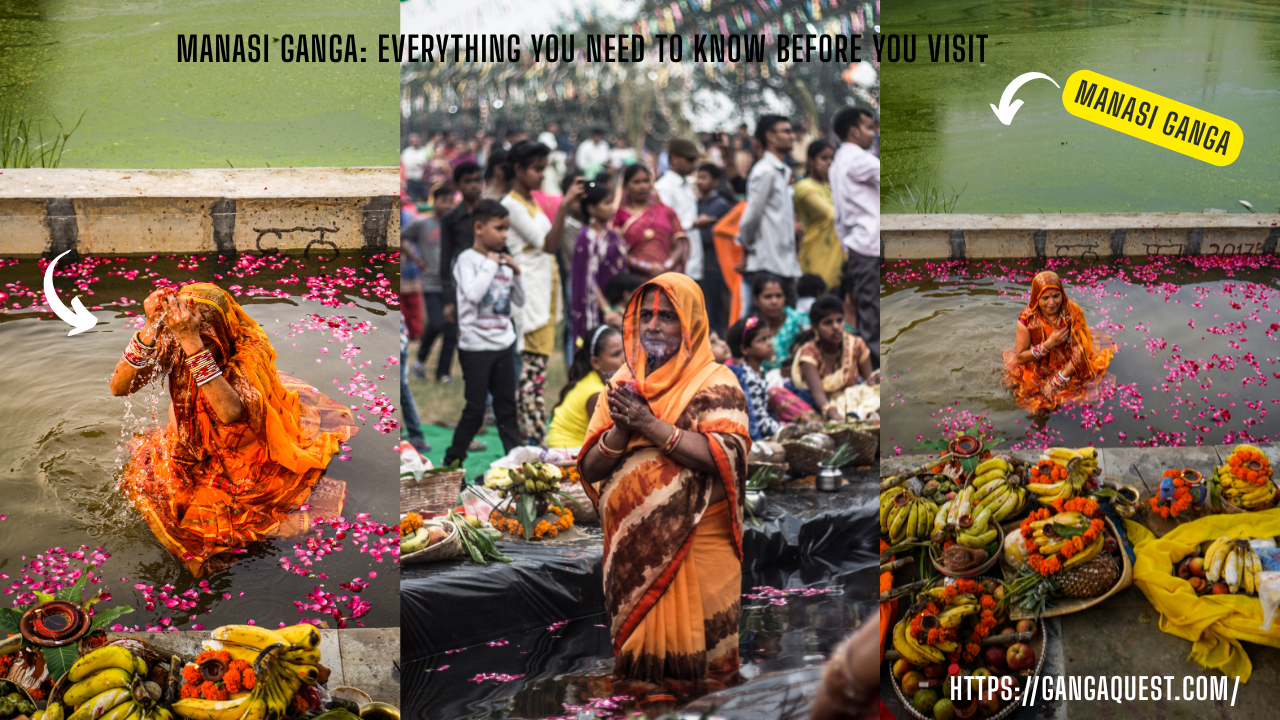
Introduction
Every year, more than 10 million pilgrims walk around Govardhan Hill in Uttar Pradesh. Right at the heart of this sacred town sits Manasi Ganga, a holy lake that Hindus believe was created by Lord Krishna himself. It is not just a body of water. For devotees, it holds the same spiritual power as the river Ganga. If you are planning a visit to Govardhan or the larger Braj region, Manasi Ganga should be at the very top of your list.
This article covers everything you need to know before you go. You will learn about the lake’s religious history, the temples surrounding it, rituals performed here, the best time to visit, how to get there, where to stay, and practical travel tips that will make your trip smooth and meaningful. Whether you are a devout pilgrim or a curious traveler, this guide will help you plan with confidence.
What Is Manasi Ganga?
Manasi Ganga is a sacred lake located in the town of Govardhan in the Mathura district of Uttar Pradesh, India. The word “Manasi” comes from the Sanskrit word “manas,” which means mind. According to Hindu belief, Lord Krishna created this lake using only the power of his mind. That is why it is called Manasi Ganga, meaning the Ganga born from the mind.
The lake sits at the base of Govardhan Hill, one of the holiest sites in Hinduism. It is surrounded by ancient temples, ghats (steps leading to water), and narrow lanes filled with pilgrims. For centuries, this lake has been a central point of worship and devotion in the Braj region. Devotees believe that taking a dip in Manasi Ganga washes away sins, just like bathing in the river Ganga in Varanasi.
The lake is not very large in size, but its spiritual importance is enormous. It serves as the starting point or a key stop during the Govardhan Parikrama, a 21 kilometer walk around Govardhan Hill that millions of Hindus complete every year.
The Legend Behind Manasi Ganga
The story of Manasi Ganga is deeply tied to Lord Krishna and the people of Braj. According to the Bhagavata Purana and local folklore, after Krishna lifted Govardhan Hill to protect the villagers from a devastating storm sent by Lord Indra, the people of Braj wanted to celebrate. They were overjoyed and grateful, but a question came up. The elders suggested that everyone should bathe in the holy Ganga to mark the occasion and purify themselves.
The river Ganga, however, was far away. Traveling there would have taken days. Krishna, seeing the devotion and practical difficulty of his people, smiled and summoned the Ganga using his divine will. The holy river appeared right there at the foot of Govardhan Hill, forming the lake we now call Manasi Ganga.
There is another layer to this story. Some versions say that after the lake appeared, the local residents were still unsure if it truly held the same sanctity as the original Ganga. To remove their doubts, Krishna is said to have invited all the sacred rivers and holy waters of India to merge into Manasi Ganga. This is why devotees believe that bathing here is equal to bathing in all the holy rivers combined.
This legend is not just a story for the people of Govardhan. It is a living belief. You will see priests reciting these tales on the ghats. Families bring their newborns here. Elderly devotees come to spend their final years near its waters. The faith is deep and personal.
Religious Significance of Manasi Ganga
Manasi Ganga holds a very special place in the Vaishnava tradition, the branch of Hinduism devoted to Lord Vishnu and his avatars, especially Krishna. The lake is considered one of the most sacred spots in the entire Braj Mandal, the region associated with Krishna’s childhood and youth.
Bathing in Manasi Ganga is believed to grant the same spiritual merit as bathing in the Ganga at Prayagraj during the Kumbh Mela. This is a powerful claim, and it shows how deeply this lake is respected. For many pilgrims, a visit to Govardhan is incomplete without spending time at Manasi Ganga, offering prayers, and taking a holy dip.
The lake is also closely linked to the Govardhan Parikrama. Most pilgrims begin or end their Parikrama at Manasi Ganga. Some traditions say you should first bathe in the lake, offer prayers at the surrounding temples, and then start your walk around the hill. This ritual sequence gives the Parikrama its full spiritual meaning.
During festivals like Govardhan Puja (celebrated the day after Diwali), Kartik Purnima, and Annakut, the area around Manasi Ganga comes alive with thousands of devotees. Oil lamps float on the water, the air fills with devotional songs, and the ghats are packed with families performing rituals. It is a sight that stays with you long after you leave.
Temples Around Manasi Ganga
The area surrounding Manasi Ganga is home to several important temples. Each one has its own history and spiritual importance. Visiting these temples adds depth and richness to your experience at the lake. Here are the most notable ones.
Harideva Temple
The Harideva Temple is one of the oldest and most significant temples near Manasi Ganga. It was built in 1590 AD during the reign of Mughal Emperor Akbar, with the support of Raja Bhagwan Das of Amber. The temple is made of red sandstone and follows a blend of Hindu and Mughal architectural styles. The main deity here is Lord Harideva, a form of Lord Vishnu. The temple stands tall and can be seen from a distance, acting as a landmark for the entire area.
Mukut Mukharvind Temple
This temple is located right on the banks of Manasi Ganga. It is dedicated to Lord Krishna and houses a beautiful idol that is said to be self manifested. The temple has a peaceful atmosphere, and the view of the lake from its steps is calming. Many pilgrims stop here before or after their dip in the lake.
Daan Ghati Temple
Perched on a small hillock near the lake, the Daan Ghati Temple is associated with the legend of Krishna collecting a toll or “daan” from the gopis (milkmaids) who passed by. The temple offers a panoramic view of Manasi Ganga and the surrounding town. Climbing up to this temple is a short effort, but the view and the story behind it make it worthwhile.
Chakra Tirtha Temple
Located a short walk from Manasi Ganga, this temple is associated with Lord Vishnu’s Sudarshan Chakra. It is a quieter temple compared to the others, making it a good place for meditation and reflection. Pilgrims who want a less crowded experience often spend time here.
Other Smaller Shrines
Dozens of smaller shrines, ashrams, and prayer halls dot the lanes around Manasi Ganga. Some are centuries old. Others are maintained by local saints and spiritual communities. Walking through these narrow streets feels like stepping back in time. Every corner has a story, and every wall seems to echo with devotion.
Things to Do at Manasi Ganga
A visit to Manasi Ganga is more than just seeing a lake. There are several activities and experiences that make the trip meaningful and memorable.
Take a Holy Dip. This is the most common ritual. Devotees bathe in the lake early in the morning, believing that the sacred water purifies the soul. Even if you are not religious, sitting by the ghats and watching the morning rituals is a peaceful experience.
Attend the Evening Aarti. Every evening, priests perform aarti (a lamp ceremony) on the ghats of Manasi Ganga. The sound of bells, the glow of oil lamps on the water, and the chanting create an atmosphere that is both moving and beautiful. This is one of the best experiences you can have here.
Walk Around the Lake. The lake is surrounded by ghats, temples, and old buildings. A slow walk around the lake takes about 30 to 45 minutes and gives you a chance to absorb the sights, sounds, and energy of the place. Street vendors sell flowers, incense, and small offerings along the way.
Visit the Surrounding Temples. As mentioned above, several important temples are located within walking distance. Spending a couple of hours exploring these temples adds historical and spiritual depth to your visit.
Start or End Your Govardhan Parikrama Here. If you plan to do the Govardhan Parikrama (the 21 kilometer walk around Govardhan Hill), Manasi Ganga is the traditional starting or ending point. Many pilgrims perform rituals at the lake before beginning their walk.
Feed the Fish and Turtles. The lake is home to fish and turtles that are considered sacred. Devotees feed them with puffed rice and flour balls. This is a simple but joyful activity, especially if you are visiting with children.
Photography and Reflection. The architecture around the lake, the reflections on the water, and the vibrant colors of the temples make Manasi Ganga a wonderful spot for photography. Early mornings and late afternoons offer the best light.
Best Time to Visit Manasi Ganga
The best time to visit Manasi Ganga depends on what kind of experience you want. Here is a simple breakdown.
October to March is the most comfortable period. The weather is cool and pleasant, making it ideal for walking around the lake, visiting temples, and doing the Govardhan Parikrama. Temperatures range from 8°C to 25°C. This is also the peak pilgrimage season, so expect crowds, especially during festivals.
July to September is the monsoon season. The lake fills up during the rains, and the surrounding landscape turns green. The atmosphere is lush and beautiful, but the streets can get muddy and slippery. Fewer tourists visit during this time, so you get a more peaceful experience.
April to June is summer. Temperatures can soar above 45°C in Mathura district. Visiting during this period is tough, especially if you plan to walk outdoors. If you must visit in summer, plan your activities for early morning or late evening. Carry plenty of water and wear light clothing.
Festival Times bring a completely different energy. Govardhan Puja (October or November), Kartik Purnima (November), Janmashtami (August or September), and Holi (March) are the most vibrant times to be here. The crowds are large, but the energy and devotion are unmatched. If you want to see Manasi Ganga at its most alive, visit during one of these festivals.
How to Reach Manasi Ganga
Manasi Ganga is located in Govardhan town, which falls under the Mathura district of Uttar Pradesh. Getting here is straightforward, and there are multiple options depending on where you are coming from.
By Air. The nearest airport is the Agra Airport (Kheria), about 80 kilometers away. However, it has limited flights. The Indira Gandhi International Airport in New Delhi is about 160 kilometers away and is the most practical option for those flying in. From either airport, you can hire a taxi or take a bus to Mathura and then to Govardhan.
By Train. Mathura Junction is the nearest major railway station. It is well connected to Delhi, Agra, Jaipur, Mumbai, and other major cities. From Mathura Junction, Govardhan is about 25 kilometers away. You can take an auto rickshaw, a shared taxi, or a local bus to reach Govardhan town. The ride takes about 40 to 50 minutes.
By Road. Govardhan is connected by road to Mathura, Vrindavan, Delhi, and Agra. If you are driving from Delhi, take the Yamuna Expressway to Mathura and then follow the signs to Govardhan. The total drive from Delhi takes about 3 to 4 hours, depending on traffic. State transport buses and private buses run regularly between Mathura and Govardhan.
Local Transport Within Govardhan. Once you reach Govardhan town, Manasi Ganga is easy to find. It is right in the center of town. You can walk to it from the bus stand in about 10 minutes. Auto rickshaws and cycle rickshaws are also available for short distances.
Where to Stay Near Manasi Ganga
Govardhan is a pilgrim town, so accommodation options are mostly simple and affordable. You will find dharamshalas (pilgrim rest houses), ashrams, budget hotels, and a few mid range options. Here is what to expect.
Dharamshalas and Ashrams are the most common type of accommodation. Many temples and religious trusts operate dharamshalas near Manasi Ganga. These offer basic rooms, shared bathrooms, and simple vegetarian meals. Some are free, while others charge a very small fee. They are best suited for pilgrims who want a simple, spiritual experience.
Budget Hotels are available in Govardhan town and along the road between Mathura and Govardhan. These offer private rooms with attached bathrooms, fans or air conditioning, and basic amenities. Prices typically range from INR 500 to INR 1500 per night.
Mid Range Hotels with better facilities are mostly found in Mathura or Vrindavan, which are 25 to 30 kilometers away. If you prefer more comfortable accommodation with restaurants, Wi Fi, and room service, staying in Mathura and making a day trip to Govardhan is a good option.
Booking Tip. During festival seasons like Govardhan Puja and Kartik Purnima, rooms fill up fast. Book well in advance if you plan to visit during these times. During the off season, you can usually find rooms on the spot without any trouble.
Food and Dining Options
Govardhan is a strictly vegetarian town. You will not find meat, eggs, or alcohol anywhere in the area. This is in keeping with the religious nature of the place. The food is simple, fresh, and satisfying.
Most eateries around Manasi Ganga serve North Indian vegetarian food. You will find dal, rice, roti, sabzi (vegetable curries), and curd at almost every restaurant. Street food is also popular. Try the local kachori, samosa, jalebi, and lassi. The pedas (sweet milk cakes) from Mathura are famous across India, and you will find them in Govardhan as well.
Many temples near Manasi Ganga offer free meals, known as “bhandara” or “prasadam.” These meals are cooked as an offering to God and then served to visitors. The food is simple but made with devotion. Eating at a temple bhandara is an experience in itself.
If you have dietary restrictions or prefer specific cuisines, your options will be limited in Govardhan. Carrying some snacks and packaged food is a good idea, especially if you are visiting with young children or elderly family members.
Practical Travel Tips for Visiting Manasi Ganga
Here are some practical tips that will help make your visit to Manasi Ganga smooth and enjoyable.
Wear Comfortable Footwear. You will be walking on stone ghats, narrow lanes, and possibly uneven terrain. Slip on shoes or sandals with good grip are ideal. You will need to remove your footwear at temples, so avoid shoes with complicated laces.
Dress Modestly. Govardhan is a deeply religious town. Wearing simple, modest clothing that covers your shoulders and knees is respectful and appreciated. Both men and women should keep this in mind.
Carry Cash. ATMs are available in Govardhan, but they are not always reliable. Many shops, eateries, and dharamshalas accept only cash. UPI payments are accepted at some places, but do not depend on them entirely.
Stay Hydrated. Especially during summer, the heat in this region can be intense. Carry a water bottle and refill it regularly. Avoid drinking lake water or unfiltered tap water.
Respect the Lake. Manasi Ganga is a sacred site. Do not litter, throw plastic, or pollute the water. Follow the local customs and be respectful of people performing rituals. Loud behavior or disruptive actions are frowned upon.
Plan Your Timing. The ghats are busiest during early morning and evening aarti hours. If you want a peaceful experience, visit during mid morning or early afternoon. For the full spiritual experience, attend the evening aarti.
Watch Out for Monkeys. Govardhan has a large monkey population. They can snatch food, water bottles, and small bags. Keep your belongings secure and avoid eating in open areas where monkeys are visible.
Photography Etiquette. Photography is allowed at the lake and on the ghats. However, some temples do not allow cameras inside. Always ask before photographing people, especially during prayer or rituals.
Nearby Attractions Worth Visiting
If you have extra time, there are several other sacred and historical sites near Manasi Ganga that are worth exploring.
Govardhan Hill is the main attraction. Walking around the hill, known as Govardhan Parikrama, is a 21 kilometer spiritual walk that takes 5 to 7 hours on foot. Many pilgrims do it barefoot. You can also do it by vehicle on a paved road that runs alongside the walking path.
Kusum Sarovar is a beautiful stepped tank located along the Parikrama route, about 2 kilometers from Manasi Ganga. It is surrounded by elegant sandstone structures and cenotaphs. The architecture here is stunning, and it is one of the most photogenic spots in the entire region.
Radha Kund and Shyam Kund are twin sacred ponds located about 8 kilometers from Manasi Ganga. They are considered among the holiest spots in the Braj region. According to legend, Radha and Krishna used to meet here. Devout Vaishnavas consider a dip in Radha Kund to be the highest form of spiritual blessing.
Jatipura is a small village at the base of Govardhan Hill where pilgrims can see the “mukharvind” (face) of Govardhan Hill. A temple here is dedicated to the hill itself, which is worshipped as a deity.
Mathura and Vrindavan are both within 30 kilometers of Govardhan. Mathura is the birthplace of Lord Krishna, and Vrindavan is where he spent his youth. Together, they offer dozens of temples, ghats, and sacred sites. Most visitors combine Govardhan with Mathura and Vrindavan in a 2 to 3 day trip.
Common Questions About Manasi Ganga
Is there an entry fee? No. Manasi Ganga is a public sacred site. There is no entry fee to visit the lake or the ghats. Some temples may have a small donation box, but there is no mandatory charge.
Can non Hindus visit? Yes. Manasi Ganga and most temples around it are open to people of all faiths. Visitors are simply expected to be respectful of the religious customs and practices.
Is it safe for solo travelers? Govardhan is generally safe, including for solo travelers and women. The town is small, and most people are pilgrims or locals. As with any travel, basic precautions like being aware of your surroundings and securing your belongings are wise.
How much time should I spend here? A visit to Manasi Ganga and the surrounding temples takes about 2 to 3 hours. If you also want to attend the evening aarti and explore the lanes, plan for half a day. If you are doing the full Govardhan Parikrama, set aside an entire day.
Is the lake clean? The cleanliness of Manasi Ganga has been a concern. Local authorities and religious organizations have made efforts to clean and maintain the lake. The water quality varies by season. During the monsoon, the lake is fuller and often cleaner. In the dry summer months, water levels can drop significantly.
The Environmental and Cultural Importance of Manasi Ganga
Beyond its religious significance, Manasi Ganga plays an important role in the local ecosystem and cultural identity of Govardhan. The lake has been a source of water for the town for centuries. Birds, fish, and turtles depend on it. The ghats and temples around it form the cultural center of the community.
In recent years, there has been growing concern about pollution and encroachment around the lake. Plastic waste, sewage, and construction have threatened its health. Several non profit organizations and government bodies have launched clean up drives and conservation projects. The National Green Tribunal has also issued directives to protect the ecological integrity of the Govardhan area, including Manasi Ganga.
As a visitor, you can contribute to conservation by not littering, avoiding single use plastic, and supporting local businesses that practice responsible tourism. Small actions by millions of visitors can make a real difference over time.
Suggested Itinerary for a Day at Govardhan
If you only have one day in Govardhan, here is a simple plan.
Start early. Reach Manasi Ganga by 6:00 AM. Take a dip in the lake if you wish. Visit the Harideva Temple and Mukut Mukharvind Temple. Walk around the lake and soak in the morning atmosphere. By 8:00 AM, have breakfast at a local eatery or temple bhandara. Then head to Kusum Sarovar, which is about 2 kilometers away. Spend about an hour there.
If you are up for the Govardhan Parikrama, start walking from Manasi Ganga. The full walk takes 5 to 7 hours. Carry water and snacks. If a full Parikrama is too much, you can drive part of the route and walk the most scenic stretches. After completing the Parikrama, return to Manasi Ganga for the evening aarti. It usually begins around sunset, roughly 6:00 PM to 7:00 PM depending on the season. End your day with a simple dinner in Govardhan before heading back to your hotel in Mathura.
Conclusion
Manasi Ganga is one of those places where history, faith, and natural beauty come together in a powerful way. It is not a flashy tourist destination. It is quiet, old, and deeply spiritual. Whether you come here for religious reasons or out of simple curiosity, the experience leaves a mark. The morning mist over the lake, the sound of temple bells, the devotion on people’s faces, and the ancient stories that echo through every lane make Manasi Ganga a place worth visiting at least once.
Plan your trip carefully. Visit during the cooler months if possible. Respect the local customs. Take your time at the ghats. And let the spirit of the place speak to you in its own way. If this guide helped you, share it with someone who is planning a trip to the Braj region. Start planning your visit to Manasi Ganga today, and experience one of India’s most sacred and underappreciated spiritual treasures.
Blog
Bilieter: Understanding the Meaning, Uses, and Growing Popularity
Published
1 month agoon
June 13, 2026By
Raju Patel
In today’s digital world, new words and terms frequently emerge across industries, technologies, and online communities. One such term that has recently attracted attention is Bilieter. While the exact definition of Bilieter may vary depending on the context in which it is used, the term has become increasingly interesting to internet users searching for information about its meaning, applications, and relevance.
This article explores Bilieter, its possible origins, uses, benefits, and why it is gaining recognition in various online discussions.
What Is Bilieter?
Bilieter is a term that has appeared in different online contexts, often associated with innovation, digital platforms, modern business concepts, or specialized services. Because it is not yet widely standardized, its interpretation can differ based on the industry or community using it.
In general, Bilieter can be viewed as a modern concept, brand name, service, or digital solution designed to simplify processes, improve efficiency, or provide unique value to users.
Possible Origins of Bilieter
Like many emerging terms, Bilieter may have originated from:
- A startup or business name
- A digital platform or software solution
- A technology-related concept
- An online community term
- A creative branding strategy
The uniqueness of the name makes it memorable and suitable for branding purposes, which may explain its growing visibility online.
Key Features Associated with Bilieter
Depending on its application, Bilieter is often linked with several modern characteristics:
1. Innovation
Bilieter represents fresh ideas and innovative approaches to solving problems. Organizations using modern concepts often focus on efficiency, user experience, and technological advancement.
2. Digital Integration
The term is frequently associated with digital tools and online services that help users manage tasks more effectively.
3. User-Centered Design
Many modern platforms prioritize simplicity and accessibility. Bilieter may symbolize solutions designed to meet user needs with minimal complexity.
4. Scalability
Whether used for business or technology purposes, Bilieter often reflects the ability to grow and adapt to changing demands.
Potential Applications of Bilieter
Business Solutions
Companies may use Bilieter-related systems to improve operations, customer engagement, and workflow management.
Technology Platforms
Bilieter can be associated with software tools, cloud-based services, or digital applications that streamline processes.
Online Communities
The term may also appear within online communities where unique concepts and specialized terminology develop over time.
Branding and Marketing
Due to its distinctive name, Bilieter has strong branding potential. Businesses often seek memorable names that stand out in competitive markets.
Benefits of Bilieter
Organizations and users who adopt innovative concepts like Bilieter may experience several advantages:
- Improved efficiency
- Better user experience
- Enhanced productivity
- Increased adaptability
- Stronger brand recognition
- Simplified processes
- Greater technological integration
These benefits make modern solutions attractive to both businesses and individual users.
Why Is Bilieter Becoming Popular?
Several factors contribute to the growing interest in Bilieter:
Digital Transformation
As businesses continue moving toward digital solutions, new concepts and tools naturally attract attention.
Search Interest
Unique terms often gain popularity as users search for their meanings and applications.
Branding Appeal
Bilieter has a distinctive and professional sound, making it appealing for companies seeking memorable brand identities.
Innovation Trends
People are increasingly interested in technologies and services that improve convenience, efficiency, and performance.
Challenges and Considerations
Like any emerging concept, Bilieter may face certain challenges:
- Limited publicly available information
- Varying interpretations across industries
- Need for clearer definitions
- Potential confusion regarding its exact purpose
As awareness grows, more consistent usage and understanding are likely to develop.
The Future of Bilieter
The future of Bilieter largely depends on how it is adopted and applied. If associated with innovative technologies, digital services, or successful brands, it could gain broader recognition and become an established term within its respective field.
The continued growth of digital transformation, automation, and online services creates opportunities for unique concepts like Bilieter to evolve and expand their influence.
Conclusion
Bilieter is an intriguing and emerging term that reflects the modern trend of innovation, digital transformation, and unique branding. Although its exact meaning may vary depending on context, it is increasingly associated with efficiency, technology, and forward-thinking solutions. As interest continues to grow, Bilieter may become more widely recognized and further establish its place in the evolving digital landscape.
FAQs
What does Bilieter mean?
Bilieter is an emerging term that may represent a brand, concept, service, or digital solution depending on its context.
Is Bilieter a company or a technology?
The term can be associated with various industries, including technology, business, and digital services.
Why is Bilieter gaining attention?
Its unique name, branding potential, and association with innovation have contributed to increasing interest.
What industries can use Bilieter?
Technology, business management, digital marketing, software development, and online services are among the industries where the term may be relevant.
What is the future of Bilieter?
As awareness and adoption increase, Bilieter could become more widely recognized as a brand, service, or innovative concept.
Blog
Methatreams: Exploring the Future of Digital Innovation
Published
1 month agoon
June 11, 2026By
Raju Patel
Introduction
In a world driven by technology and creativity, new concepts emerge every day, shaping the way people interact, work, and communicate. One such intriguing concept is Methatreams. Although the term is relatively new and open to interpretation, Methatreams represents a blend of digital innovation, intelligent systems, and immersive experiences that redefine modern connectivity.
As businesses and individuals continue to embrace digital transformation, concepts like Methatreams highlight the growing importance of adaptive technologies, data-driven solutions, and user-centered experiences. This article explores the meaning, applications, benefits, and future potential of Methatreams in today’s rapidly evolving digital landscape.
What Is Methatreams?
Methatreams can be understood as a dynamic framework that combines multiple streams of information, technology, and user interaction into a unified digital ecosystem. The concept emphasizes seamless integration, intelligent automation, and enhanced engagement across various platforms.
Rather than functioning as a single technology, Methatreams serves as a model for connecting digital resources, enabling organizations to streamline operations and create richer experiences for users.
At its core, Methatreams focuses on:
- Data integration
- Real-time communication
- Intelligent decision-making
- Personalized user experiences
- Continuous innovation
The Origin of the Concept
The rise of cloud computing, artificial intelligence, big data, and immersive technologies has created the perfect environment for concepts like Methatreams to emerge.
Traditional systems often operate independently, creating information silos and limiting collaboration. Methatreams addresses this challenge by encouraging interconnected systems that share information efficiently and intelligently.
The concept reflects the growing need for businesses and communities to adapt to a world where speed, connectivity, and innovation are essential for success.
Key Components of Methatreams
1. Intelligent Data Streams
Data is the foundation of modern digital ecosystems. Methatreams relies on continuous streams of information collected from various sources, including:
- Websites
- Mobile applications
- IoT devices
- Social platforms
- Enterprise systems
These streams are analyzed in real time to generate actionable insights.
2. Artificial Intelligence Integration
AI plays a crucial role in transforming raw data into meaningful outcomes. Through machine learning and predictive analytics, Methatreams can identify trends, automate tasks, and improve decision-making processes.
3. Seamless Connectivity
One of the defining characteristics of Methatreams is its ability to connect different technologies and platforms. This interoperability allows organizations to create cohesive digital experiences.
4. User-Centric Design
Modern users expect personalized and intuitive experiences. Methatreams prioritizes user needs by delivering relevant content, recommendations, and interactions based on individual preferences.
5. Scalability
As organizations grow, their technological requirements evolve. Methatreams supports scalable infrastructures that can adapt to changing demands without compromising performance.
Applications of Methatreams
Business Operations
Organizations can leverage Methatreams to improve efficiency, reduce costs, and enhance productivity. Integrated data streams help decision-makers gain a comprehensive view of business performance.
Benefits include:
- Faster reporting
- Automated workflows
- Improved collaboration
- Enhanced customer insights
Digital Marketing
Marketers can use Methatreams to analyze customer behavior across multiple channels. This enables highly targeted campaigns and improved customer engagement.
Applications include:
- Personalized advertising
- Customer segmentation
- Predictive marketing
- Performance optimization
Education
Educational institutions can create more engaging learning environments by integrating various learning resources and technologies.
Potential benefits include:
- Personalized learning paths
- Real-time feedback
- Improved student engagement
- Enhanced collaboration
Healthcare
Healthcare providers can use interconnected data streams to improve patient care and operational efficiency.
Examples include:
- Remote patient monitoring
- Predictive diagnostics
- Medical data integration
- Personalized treatment plans
Smart Cities
Methatreams can contribute to the development of smart cities by connecting infrastructure, transportation systems, and public services.
Benefits may include:
- Traffic optimization
- Energy efficiency
- Improved public safety
- Better resource management
Advantages of Methatreams
Enhanced Efficiency
By integrating multiple systems into a unified framework, organizations can eliminate redundant processes and improve operational efficiency.
Better Decision-Making
Real-time data analysis provides valuable insights that support informed decision-making.
Improved User Experience
Personalized interactions and seamless connectivity create more satisfying experiences for users.
Increased Innovation
Organizations adopting Methatreams are better positioned to experiment with new technologies and develop innovative solutions.
Competitive Advantage
Businesses that effectively utilize integrated digital ecosystems can respond more quickly to market changes and customer demands.
Challenges and Considerations
While Methatreams offers significant benefits, implementation may present challenges.
Data Security
Protecting sensitive information remains a top priority. Organizations must invest in robust cybersecurity measures.
Integration Complexity
Combining multiple systems and technologies can require significant planning and expertise.
Cost of Adoption
Initial investments in infrastructure, software, and training may be substantial.
Privacy Concerns
Organizations must ensure compliance with data protection regulations and maintain transparency with users.
Skill Requirements
Successfully managing Methatreams often requires specialized knowledge in data analytics, AI, and system integration.
The Future of Methatreams
The future of Methatreams appears promising as technological advancements continue to accelerate. Emerging innovations such as artificial intelligence, blockchain, augmented reality, and quantum computing may further enhance the capabilities of integrated digital ecosystems.
Future developments may include:
- More intelligent automation
- Advanced predictive analytics
- Hyper-personalized experiences
- Autonomous digital systems
- Greater cross-platform integration
As organizations increasingly recognize the value of connected technologies, Methatreams could become a foundational model for digital transformation.
Conclusion
Methatreams represents an exciting vision of the future where technology, data, and human interaction converge into a seamless ecosystem. By integrating diverse information streams and leveraging intelligent technologies, organizations can unlock new opportunities for growth, innovation, and efficiency.
Whether applied in business, healthcare, education, or smart city development, Methatreams highlights the importance of connectivity and adaptability in the digital age. As technology continues to evolve, concepts like Methatreams will play an increasingly important role in shaping the future of our interconnected world.
Trending
-
 Tech5 months ago
Remote Work: A Complete Guide to Working from Anywhere
-
 Tech6 months ago
Twizchat.com: The Future of Real-Time Online Communication
-
 Business6 months ago
FedEx: A Complete Guide to Services, Shipping Costs, and Global Logistics
-
 Tech6 months ago
Top 10 Digital Printing Companies in Chicago
-

 Ganga Quest12 months ago
Ganga Quest
-
 Ganga Updates12 months ago
Latest News, Photos, Videos on Ganga Floods
-
 Lifestyle6 months ago
Creative Grounding Techniques for Everyday Stress Relief
-

 Tech12 months ago
InternetChocks: Understanding Their Role in Online Security